- DATE:
- AUTHOR:
- Dutchie Product Team
Dutchie POS: Product Feeds in campaigns, room scoping for floor-depleted inventory alerts, fixes
Here’s what’s new and coming soon to Dutchie POS. Subject to change.
Enhancements
Loyalty & Marketing
Personalize product recommendations for marketing with Product Feeds. Marketers choose a recommendation strategy and optional product filters, then add the feed to a campaign email or SMS landing page. When a campaign is sent, Dutchie automatically selects products for each customer based on the feed’s strategy and, when available, a customer’s purchase history. Learn more in the Help Center.
Redesigned SMS template picker. Grouped categories and a live message preview allow marketers to more easily find the right template among dozens without opening each one first.
Customer tags: Better control over how you organize, segment, and reward your customer base.
Customer tags provide similar functionality to customer groups, but with additional benefits:
You can apply unlimited customer tags to customer profiles (customer groups are limited to 6 per customer)
You can use customer tags across discounts, segments, SDS, and bulk updaters.
Public API endpoints support customer tags to track profiles and employee referrals.
Navigate to Backoffice > Customers > Configure > Tags to begin creating customer tags. Access respects existing customer and discount group permissions. Updated endpoints for customer tags, discount eligibility, and loyalty point adjustments are available in the Dutchie Public API documentation.
Products & Inventory
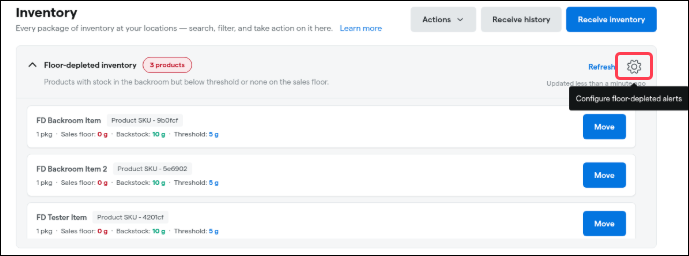
Room Scoping for Floor-Depleted Inventory Alerts. Eliminate alert noise and focus on what truly needs restocking. You can now customize which rooms are evaluated by the Floor-Depleted Inventory widget in Backoffice, ensuring alerts only trigger when sales floor stock runs low—not when items are sitting in backstock, vaults, or non-sellable storage. This eliminates false-positive restocking alerts caused by backstock, remnant batches, or non-sellable inventory.
Location-Level Defaults: Managers can configure a default room checklist for the entire location so the whole team shares a standardized view of the sales floor.
Individual User Customization: Inventory specialists and floor staff can override location defaults with their own saved room checklist to monitor only the specific areas they oversee.
Non-Cannabis Filter: Includes a toggle to easily include or exclude non-cannabis products from alerts and restock recommendations (enabled by default).
Quarantine Protection: Quarantine rooms remain excluded automatically from all alert calculations and restock suggestions.
How it works & permissions
Where to configure: Open the Floor-Depleted widget and click the cog wheel to select your watched rooms and adjust the non-cannabis toggle.
Permissions:
Location Default: Setting or updating the store-wide room configuration requires the Manage Floor-Depleted Configuration permission.
Personal View: Any user with inventory Move permissions can customize and save their personal room checklist.
Default Behavior: If no custom configuration is set, the widget continues to evaluate all inventory rooms by default.
Smart Tags
TAC % (Total Active Cannabinoids) attribute for Smart Tags. Similar to existing THC potency criteria, this update allows you to automatically tag, highlight, and merchandise products across your menu based on full cannabinoid potency.
Compliance & Traceability
We’re currently building out a feature set to support the capture of consumer consent to retain customers' personally identifying information (PII) within Dutchie. Our upcoming features will:
Allow retailers to indicate when consent has been captured by a customer
Allow retailers to configure ‘automatic’ consent sources for profiles created by 3rd party sources
Provide a consent history on customer profiles to show key timeline actions
Allow retailers to configure automatic cleanup / scrubbing of profiles without clear documented consent.
For more information about these new features as they are deployed, bookmark this page where we’ll post updates in the coming days.
Users with permission to bypass the state traceability system for adjustments can now do so at any location with the option enabled, regardless of which traceability system (Metrc, BioTrack, Utah, New Mexico, or others) that location uses. Previously this was arbitrarily limited to those four systems.
We're adding support for New York's external (out-of-state) medical patient delivery requirements, per Metrc's final guidance on how those patients' license information should be submitted.
Fixes
We're releasing fixes for the following issues:
Loyalty & Marketing
At a dispensary using an external loyalty provider only (no native Dutchie loyalty program), the Profile Completeness widget could show a customer as "Enrolled (Auto)" in loyalty when they weren't actually enrolled with the external provider.
Register showed a "Text message sent" confirmation after a loyalty sign-up even at locations not configured to send any opt-in text, leading staff and customers to expect a message that would never arrive.
Register
A customer's allotment progress bar could render fully red at 100% used even when they had plenty of remaining allotment, a regression introduced by an earlier fix.
New patients at a medical-only location could default to a recreational customer type instead of medical.
Inventory & Catalog
A package's inventory date could show a receive time about 4 hours earlier than the actual receive time, due to a systemic timezone offset.
The Inventory Snapshot by Product report could display incorrect UPC information.
Rooms belonging to other LSPs could incorrectly appear under Cultivation > Batches.
A Smart Tag intended to mark packages available for recreational customers could incorrectly match packages explicitly configured as medical-only.
Delivery
The delivery address dropdown in the Delivery modal could become unselectable, blocking the modal from saving with a "Delivery NOT saved. Specify an address" error.
Discounts & Promos
Adding new tiers to an already-paused multi-tier discount didn't carry the pause over to the new tiers, leaving them active while the rest of the discount was paused.
A multi-tier discount could drop entirely instead of applying its next tier when stacked with another discount that also qualified at a higher cart total.
Typing a dollar amount for bulk flower priced with dual (med/rec) tiers could calculate the wrong weight and overcharge the customer, due to a rounding mismatch in the price-to-weight calculator.
Public API
The Public API's receivedinventory endpoint didn't expose a receive's VCCB acquisition ID or date, even though Backoffice shows this information.
A draft receive submitted through the Public API never got an auto-generated package ID.
Metrc
Package creation could be rejected by Metrc when it included an expiration or use-by date at a facility that doesn't have Metrc's shelf-life-date permission enabled.
When voiding a transaction at the Register or in Backoffice, Dutchie POS now processes the void in Metrc immediately rather than via a delayed background job. In addition, void requests are now attributed directly to the API key of the user performing the void—falling back automatically to the location’s master API key if the user does not have a key configured or lacks void permissions. If a void cannot be completed in Metrc, users will now receive immediate notification on screen, eliminating silent sync failures and reducing inventory reconciliation discrepancies.
